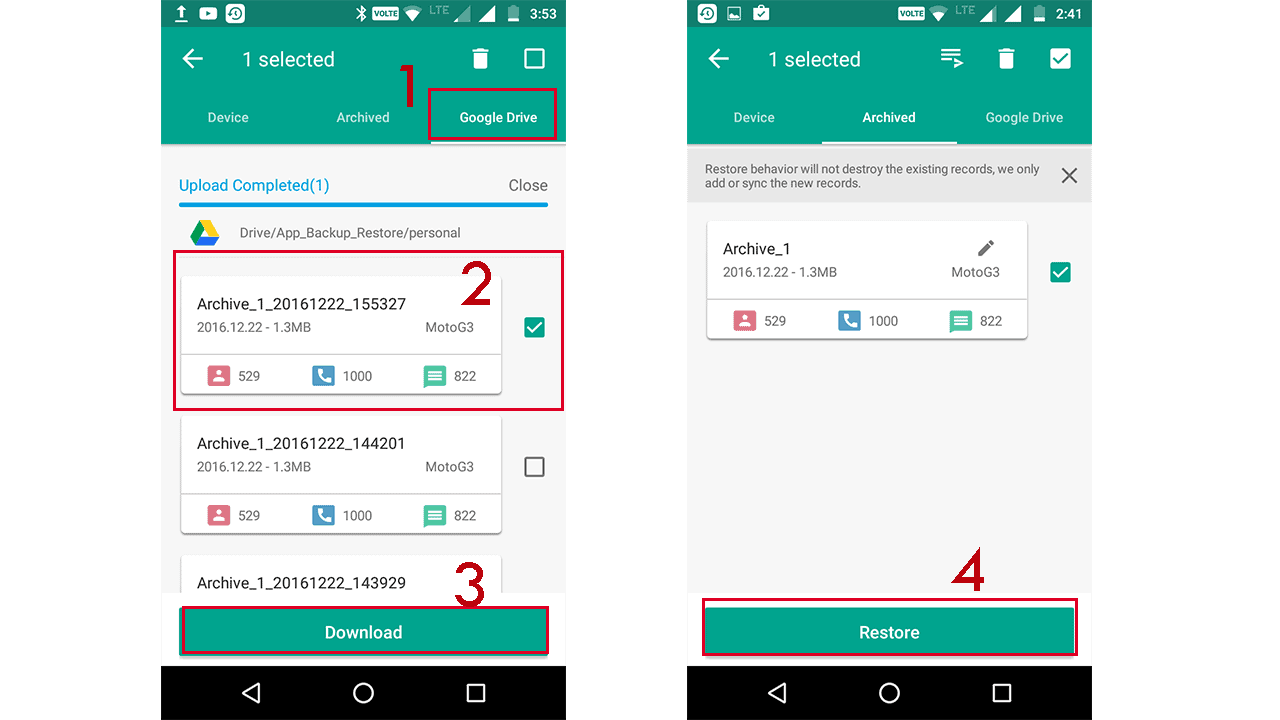
Go Backup Restore Pro. This software is very fast and home » phone apps » go backup and restore pro 3.51 android +2.2 Step 2 on the data restore interface, you are able to select what you want to restore and then tap on restore to confirm them. Enter your keyword (s) in the search box. Go backup and restore is a tool to assist backup and restoration of personal information, gadget settings, apk information, app knowledge, and so on. When data restoration is complete, there will be a notification. I backed up my texts on my old phone (which is gone now) through go sms pro's back up and restore system, but i backed it up to my computer because i though i'd be able to print them. App backup & restore cannot backup/restore/transfer data or settings of apps, it only. Restore data to huawei p40/p40 pro. If you’ve made several backups, you’ll have to. Sign in to email backup. After downloading and installing the oppo backup and restore software on computer, open it and get your oppo phone plugged to computer with a usb cable. Backup android with the #1 backup application on android: Step 2 select “backup files.” you can choose the backup files from the listed file, or you can click “open. Go backup & restore pro là công cụ giúp sao lưu và phục hồi dữ liệu, cài đặt hệ thống, các file apk, dữ liệu ứng dụng,.của người dùng. Go to control panel > system and security > backup and restore (windows 7).
Search for and restore backed up emails. سیستمی اندروید بدون نظر views: In the search box on the taskbar, type control panel. Select the set up backup option under the backup section. Get go sms pro to read the backup file it/i created. Go backup & restore pro (com.jiubang.go.backup.ex): Connect the external storage device that contains your backup files. Step 2 on the data restore interface, you are able to select what you want to restore and then tap on restore to confirm them. Go backup & restore pro là công cụ giúp sao lưu và phục hồi dữ liệu, cài đặt hệ thống, các file apk, dữ liệu ứng dụng,.của người dùng. Mybackup pro empowers users of android mobile devices to backup their android's applications, photos, videos, music, and data onto the sd card or to the cloud (our online secured servers).
Select Another Backup To Restore Files From , Select The Location Of Your External Storage Device, And.
سیستمی اندروید بدون نظر views: Go backup and restore is a tool to assist backup and restoration of personal information, gadget settings, apk information, app knowledge, and so on. Step 2 on the data restore interface, you are able to select what you want to restore and then tap on restore to confirm them. If you’ve made several backups, you’ll have to. Connect the external storage device that contains your backup files. Go to the second section named “backup & restore” from this section click “restore device” to restore files to device from the previous backup. After that, tap backup to go ahead. Step 2 select “backup files.” you can choose the backup files from the listed file, or you can click “open. Search for and restore backed up emails.
Restore Files With Backup And Restore.
Go backup & restore pro (com.jiubang.go.backup.ex): This software is very fast and home » phone apps » go backup and restore pro 3.51 android +2.2 It is a handy tool for files that you change frequently, like a word document or ppt presentation. To restore backup settings, go to the same settings page and choose recover settings instead. Email backup searches for keywords in email headers, including: After downloading and installing the oppo backup and restore software on computer, open it and get your oppo phone plugged to computer with a usb cable. Go to control panel > system and security > backup and restore (windows 7). If you want to backup your files with windows 11 backup and restore, you can follow the graphic tutorial below. Go backup & restore pro نرم افزار ساده، قدرتمند و رایگان ارائه شده از تیم go dev، برای تهیه بک آپ از مخاطبین، پیام ها و نرم افزارهای نصب شده با شبکه اجتماعی و پیام رسان پاتوق، رفاقت کن.
App Backup Restore Use Accessibility Services To Improve Auto Uninstall Feature In Some Devices.
To restore from go tap the top icon (left) on the message bar in the popup box tap sms b&r choose the restore sms tap the advanced on the bottom right then pick and choose which threads to restore. Comparably, coolmuster android backup manager mainly features backup and restore, and it is very simple to operate which is good for people who are looking for a simple backup tool. I backed up my texts on my old phone (which is gone now) through go sms pro's back up and restore system, but i backed it up to my computer because i though i'd be able to print them. Go backup & restore pro là công cụ giúp sao lưu và phục hồi dữ liệu, cài đặt hệ thống, các file apk, dữ liệu ứng dụng,.của người dùng. Mybackup pro empowers users of android mobile devices to backup their android's applications, photos, videos, music, and data onto the sd card or to the cloud (our online secured servers). Find out why over 5 million people have chosen mybackup as their secure source for a backup solution. Backup and restore tool to help backup and restore user data, system settings, apk files, app data, etc. Go backup and restore pro 3.51 for android +2.2 در تاریخ: Backup and restore tool to help backup and restore user data, system settings, apk files, app data, etc.
